

Write a post
Publish a news update or story on your public site’s Posts page, straight from the site builder.
-
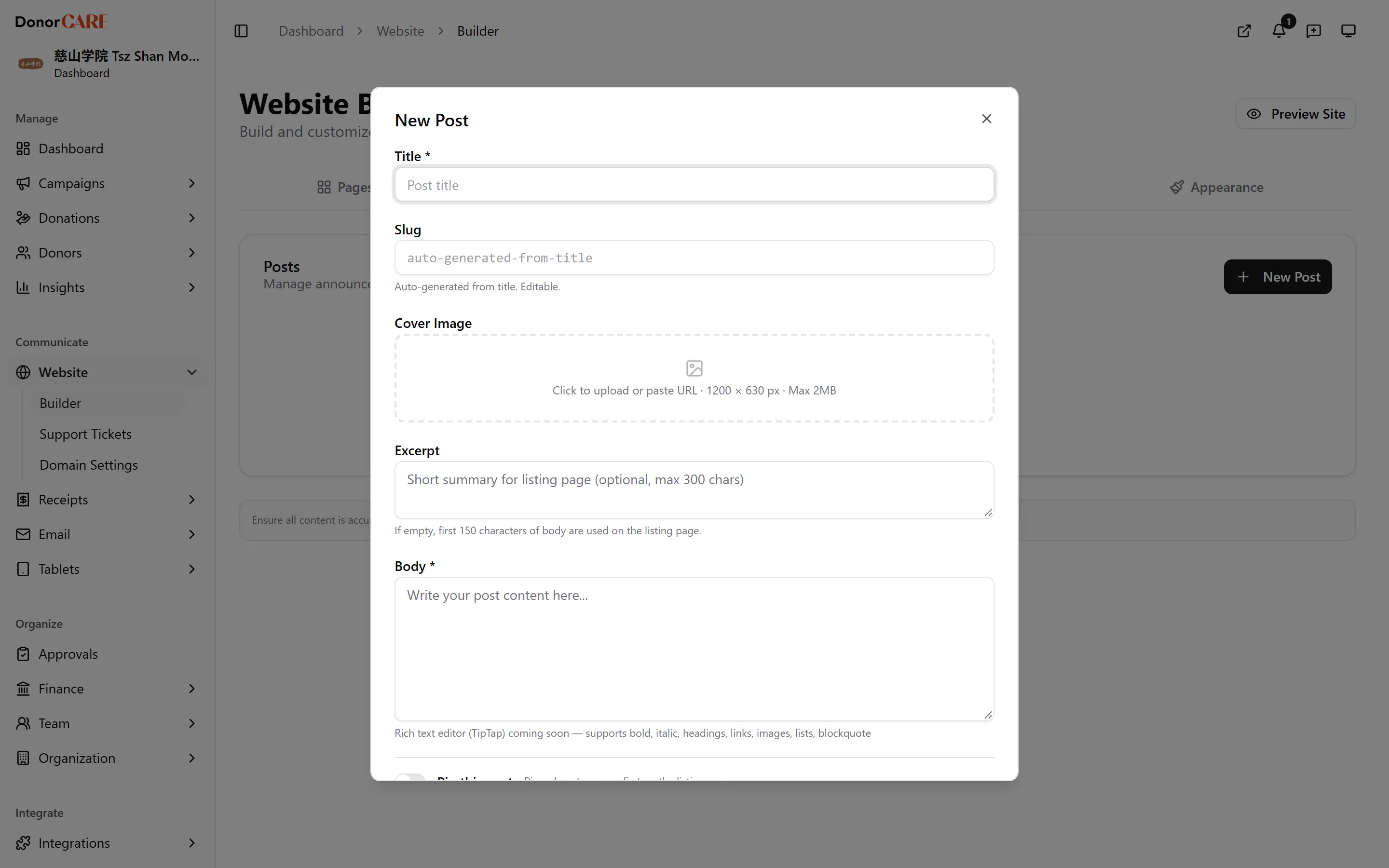
Open Website, then Builder, then select the Posts tab. Select New Post.
-
Enter a Title. DonorCARE fills in the Slug — your post’s web address — from it automatically. Edit the slug if you want a different one.
-
Add an Excerpt if you want a specific summary on the listing page. Leave it blank and DonorCARE uses the start of your post instead.
-
Write your update in the Body field.
-
Turn on Pin this post if you want it to stay at the top of your Posts page, ahead of anything published after it.
-
Select Save as Draft to keep working on it later, or Publish to make it live straight away. Either way it appears in your Posts list, marked Draft or Published.
If something goes wrong
Section titled “If something goes wrong”| What you see | What it means | What to do |
|---|---|---|
| A published post doesn’t show on your homepage | The Latest Posts section is turned off, or not set to show on your homepage | Turn on Latest Posts under Pages & Sections and confirm it’s set to show on the homepage. |
Related
Section titled “Related”Screenshots use sample data. Every screen on this page is captured against a demo organisation seeded with generated donors, amounts, receipt numbers and campaigns. Any resemblance to a real person or organisation is coincidental.