Find a name and correct it
Checking whether a name is on the tablets, fixing a misspelling, and correcting a name that is already printed.
Find a Name answers “is my family’s name up?” and fixes a misspelt one, from a phone or a desktop. It searches the names registered on one dharma event campaign.
Find a name
Section titled “Find a name”-
Open Find a Name. On a phone, select Find a Name on the dashboard.
-
Choose the campaign. Only dharma event campaigns are listed, open ones first. DonorCARE remembers your choice on this device.
-
Search. Type a donor’s name, a phone number, or the name written on the tablet. “No entries match.” means nothing matched. If the list says “Type more to narrow it”, add more letters.
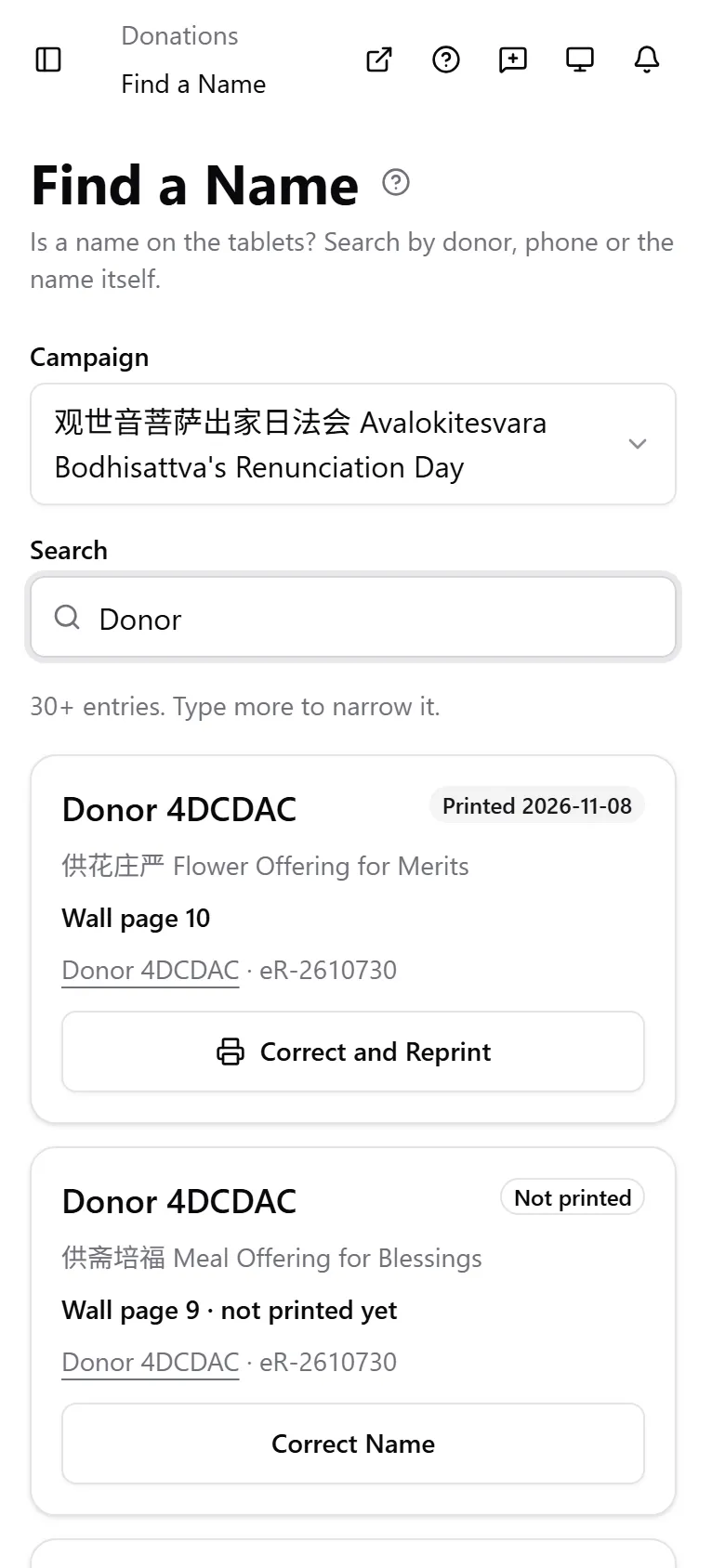
Each result shows the names, the offering, a status badge, where the name is, and the donor with their receipt number. Select the donor to open the donation.
What the status badge means
Section titled “What the status badge means”| Badge | Meaning |
|---|---|
| Not printed | The name has not been through a print run yet |
| Generated | The page was generated, but nobody has marked it printed |
| Printed, with a date | The page was marked printed on that date |
What the location line means
Section titled “What the location line means”| Location line | Meaning |
|---|---|
| Wall page 4 · not printed yet | The name is on page 4 of the wall display, which has not been printed |
| Wall page 4 | It was printed on page 4 of the wall display |
| Addendum page 2 · not printed yet | It will print on page 2 of the next addendum pack. See Generate tablets |
| Addendum page 2 | It was printed on page 2 of an addendum pack. The date on the Printed badge tells you which pack |
| Not on a tablet yet | The donation is completed but the name has no page yet |
| Not on a tablet until the gift is verified | The donation is still pending verification |
An offering with several parts shows the part first, for example “Memorial pack · Wall page 4”.
Correct a name that is not printed yet
Section titled “Correct a name that is not printed yet”- Select Correct Name on the result.
- Edit the name fields. You can only change the text in the slots the entry already has.
- Select Save Name.
Names only. The number of names, the offering, the tier and the amount never change here. To change any of those, edit the donation itself.
Correct a name that is already generated or printed
Section titled “Correct a name that is already generated or printed”A tablet that exists on paper is never edited behind the paper. Instead, the entry goes back to the print queue with its corrected name.
Staff whose role can update Tablets see Correct and Reprint on such a result. By default that is Owner, Admin and Member. Finance and Viewer do not have it and see “Already printed. Ask the tablet coordinator to correct and reprint it.” (for a generated tablet, “The tablet is already generated. Ask the tablet coordinator to correct and reprint it.”). Ask someone who has the button. An Owner can change a role’s access under Roles and permissions.
-
Select Correct and Reprint.
-
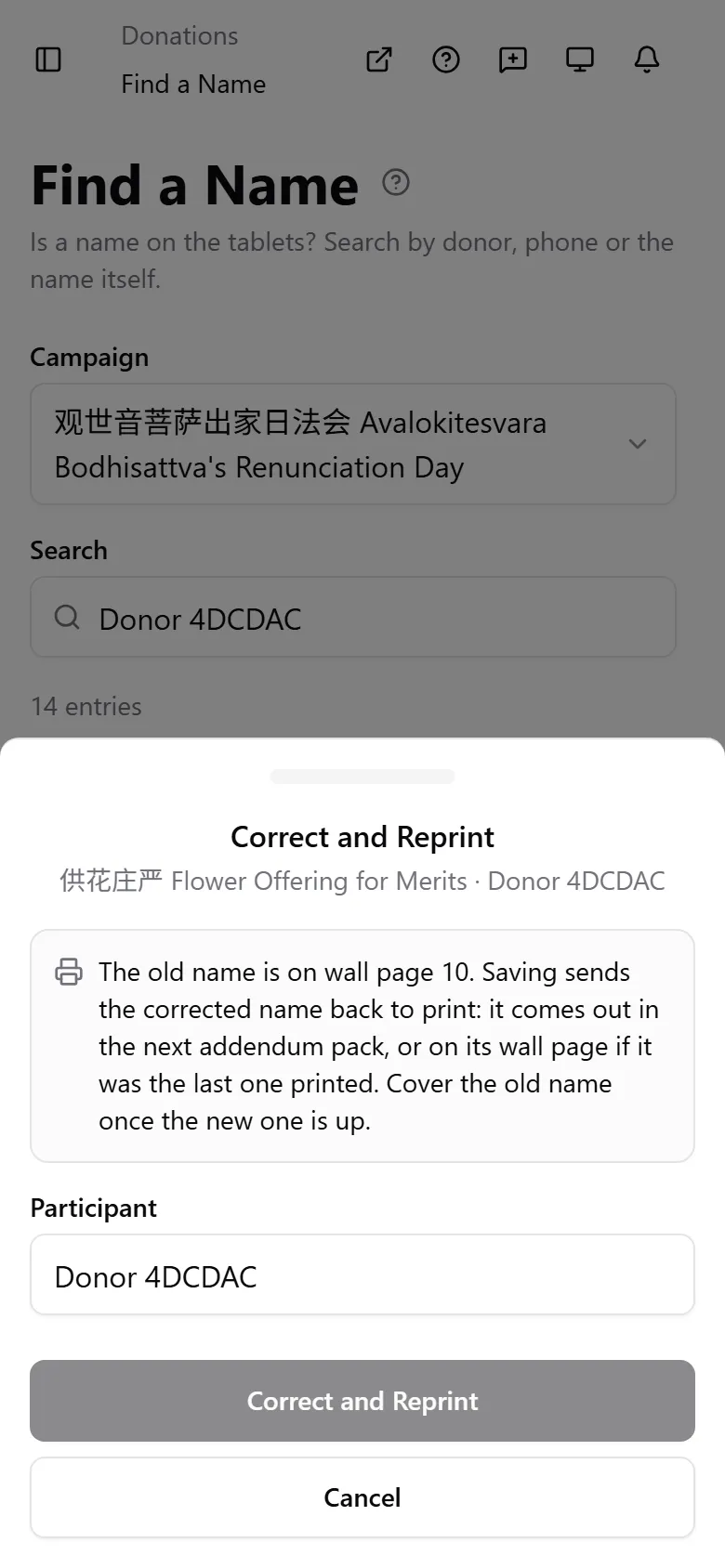
Read the note in the drawer. It names the place of the old name, for example “The old name is on wall page 4”.
-
Edit the name and select Correct and Reprint. A message confirms the name is back in the print queue on the Tablets page.
-
Print it from the Tablets page. The corrected name prints in the next Addendum pack, or on its wall page if it was the last one printed.
-
Cover the old name on the wall once the new one is up. DonorCARE keeps a record of the old name, but it cannot change the paper.
Why the donation edit form will not change a printed name
Section titled “Why the donation edit form will not change a printed name”On a donation’s edit form, an entry whose tablet is already generated or printed shows “Tablet already generated, so this entry is locked” (or “printed”), and tells you a tablet coordinator can correct and reprint it from Find a Name. You cannot rename, move or remove that entry there. Use Correct and Reprint.
If something goes wrong
Section titled “If something goes wrong”| What you see | What it means | What to do |
|---|---|---|
| No campaign to choose | You have no dharma event campaign | Tablets only exist on dharma events |
| “Ask the tablet coordinator to correct and reprint it.” instead of a button | Your role cannot update Tablets | Ask an Owner, Admin or Member |
| “Nothing changed.” | You saved the same text | Edit the name first |
Related
Section titled “Related”Screenshots use sample data. Every screen on this page is captured against a demo organization seeded with generated donors, amounts, receipt numbers and campaigns. Any resemblance to a real person or organization is coincidental.