

Reconcile a bank statement
Reconciliation checks the donations you recorded against the money that actually reached your bank, so you can close a month knowing the two agree.
Before you start
Section titled “Before you start”- A bank statement, exported as a CSV from your bank.
- If you take gateway donations, a CHIP settlement report — DonorCARE pulls this for you, so you don’t need to export it yourself.
-
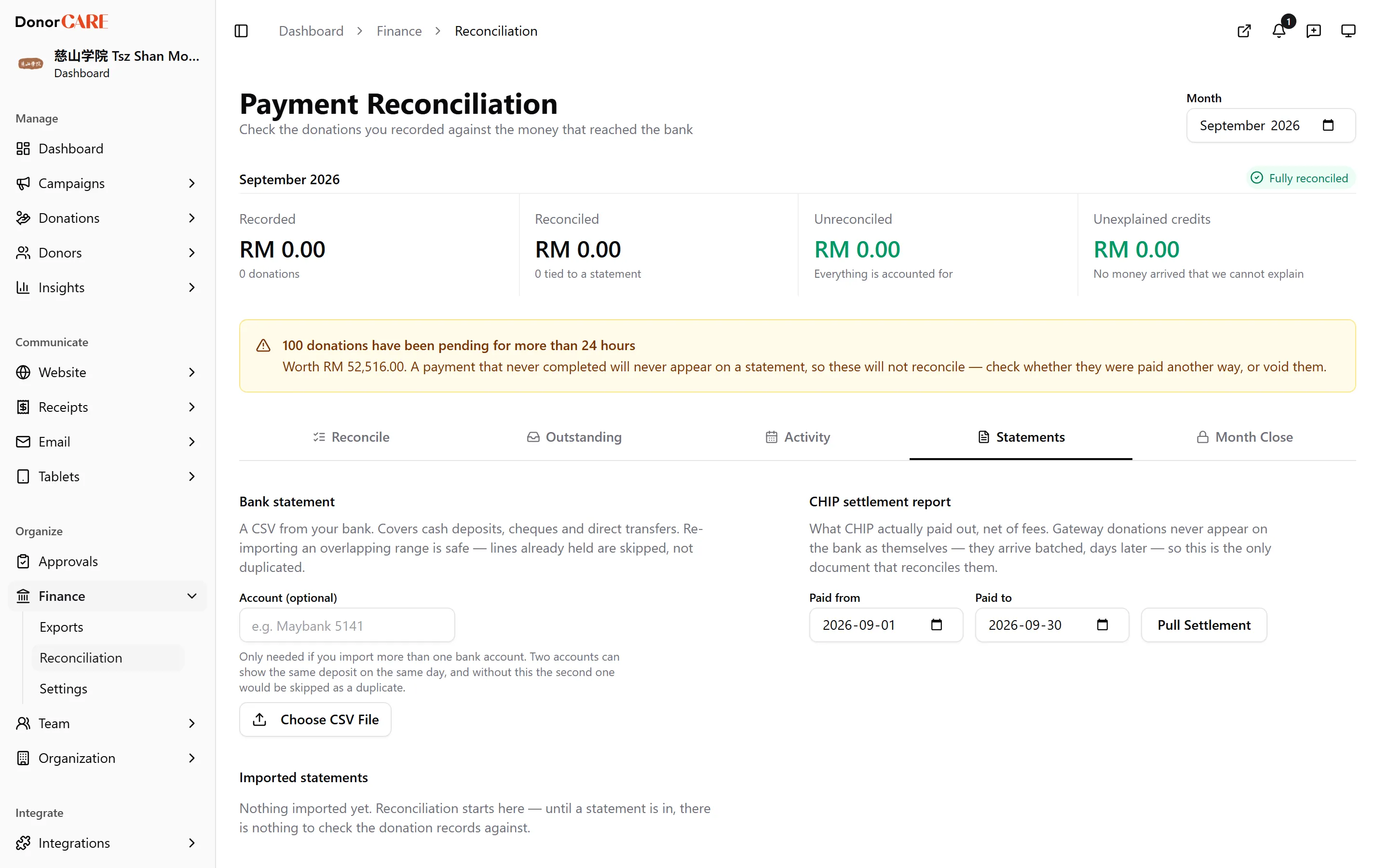
Open Finance → Reconciliation, and bring in a statement. For a bank statement, optionally label the account (useful if you reconcile more than one), then select Choose CSV File. For gateway money, set a date range and select Pull Settlement instead — DonorCARE asks CHIP directly for what it paid out.
-
Work the queue. Every line starts as Needs matching. DonorCARE claims a match on its own wherever the evidence is decisive — a matching bank reference, or a single donation for the exact amount — using each donation’s cash date: its payment date if one is recorded, otherwise the date it was entered. Whatever it can’t claim with confidence is left for you.
-
Match a line by hand. Select Match, tick the donations that make up the deposit, and watch the running total — DonorCARE shows exactly how far your selection is from the line, so a fortnight of collection-box gifts banked as one deposit is a tick-list, not mental arithmetic.
-
Set aside anything that isn’t a donation — bank interest, a transfer between your own accounts, a bank charge. Select Set Aside and give a short reason; it’s kept in the audit trail. A debit line (a charge or a reversal) can only ever be set aside, never matched to a donation.
-
Check the balance strip at the top. Once Recorded and Reconciled agree, it reads Fully reconciled for the month, and you’re ready to close it.
What this means in practice
Section titled “What this means in practice”Do
- Expect a gateway donation to sit as “waiting on CHIP” until you pull a settlement report covering its date — it will never appear on your bank statement as itself, only as part of a lump-sum payout.
Don’t
- Expect DonorCARE to guess at a subset of donations that happens to add up to a deposit. Where more than one combination fits, it leaves the line for you rather than picking one.
If something goes wrong
Section titled “If something goes wrong”| What you see | What it means | What to do |
|---|---|---|
| A gateway donation never appears in the queue | No settlement report covers its date yet | Pull a CHIP settlement report for a wider date range |
| Two lines could both match the same donation | The amounts collide and DonorCARE won’t guess | Match the one you can confirm from the bank reference, and set the other aside or match it manually once you’re sure |
| A matched line turns out wrong | — | Select Undo on the line — it and its donations return to the queue |
Related
Section titled “Related”Screenshots use sample data. Every screen on this page is captured against a demo organisation seeded with generated donors, amounts, receipt numbers and campaigns. Any resemblance to a real person or organisation is coincidental.