

Set your receipt numbering
An Owner can change which roles have this in Account Access.
Set your receipt prefix and numbering format once, before your first receipt goes out — every number DonorCARE assigns after that follows the pattern you choose here, and it’s never reused.
Receipt numbers are unique within your own organisation, not across DonorCARE as a whole — two organisations can use the same prefix without colliding. Numbers are only ever assigned upward: a voided donation keeps the number it was given rather than freeing it up, so a gap in your sequence is not something DonorCARE can explain after the fact from the number alone — it means a voided donation is sitting somewhere in your Donations list holding that number.
Before you start
Section titled “Before you start”- Decide this before you issue your first receipt. Changing the prefix later starts a fresh sequence from 1 under the new prefix — it doesn’t renumber anything already issued, but it does mean two different formats exist in your history from that point on.
- Have your organisation’s preferred prefix ready (for example
eR-or a custom code your board already uses on paper receipts).
-
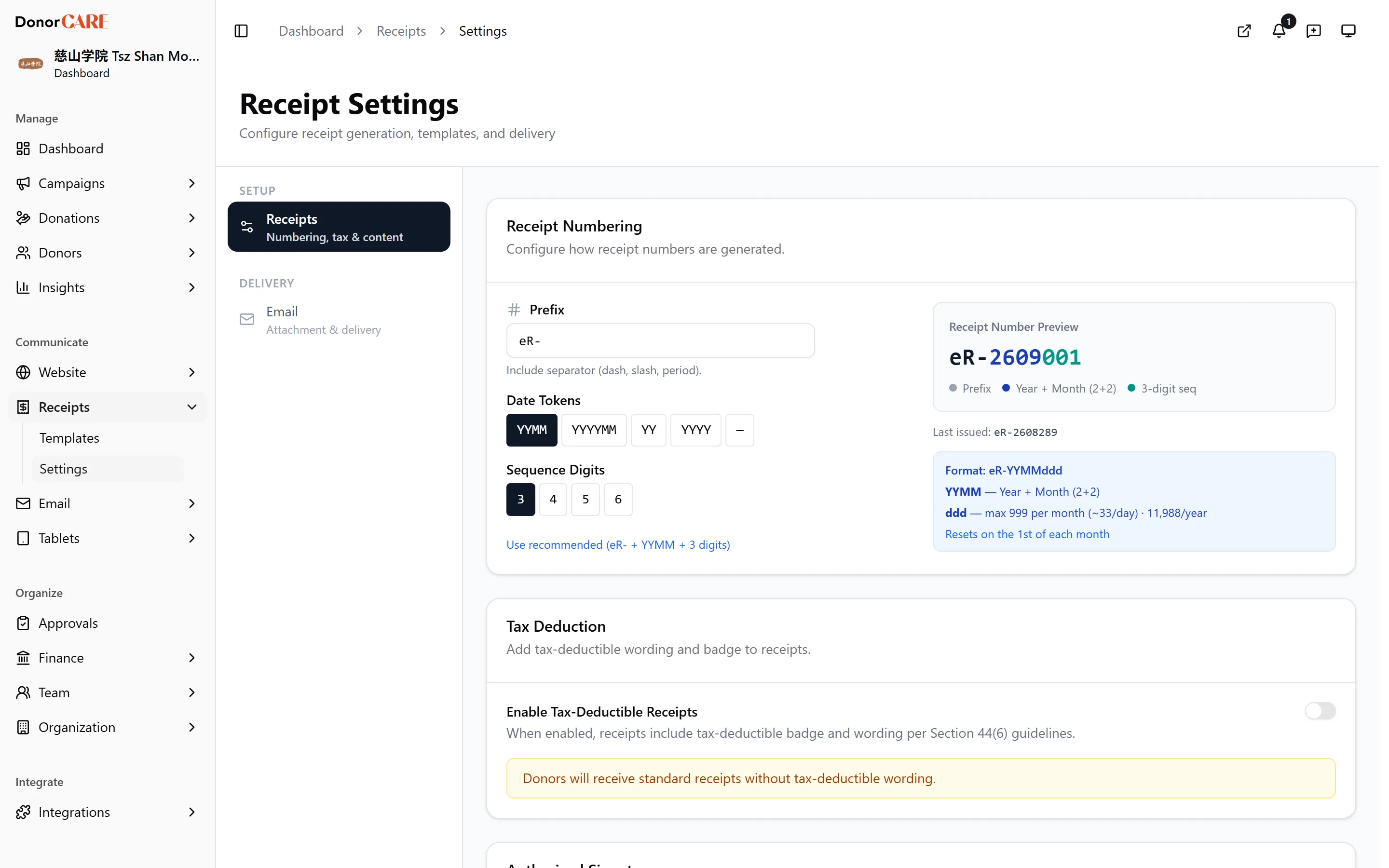
Open Receipt Settings. In DonorCARE, open Receipts, then select Settings.
-
Set your prefix. Under Prefix, type the text that appears before every receipt number, including its separator (dash, slash or period) — for example
eR-. Leave it blank to use your organisation’s shortcode instead. -
Choose a date token. Under Date Tokens, pick how much of the date appears in the number:
YYMMorYYYYMMfor a sequence that rolls over every month,YYorYYYYfor one that rolls over every year, or—(none) for one continuous sequence that never resets. -
Choose the sequence width. Under Sequence Digits, pick 3 to 6 digits for the counter itself. Check the number this allows per period against how many receipts you expect to issue — for example, a 3-digit monthly counter tops out at 999 a month.
-
Save. Select Save on the card. If you’re changing an existing prefix, DonorCARE shows the last number issued under the old format and the number new receipts will start from, and asks you to confirm — select Confirm Change.
If something goes wrong
Section titled “If something goes wrong”| What you see | What it means | What to do |
|---|---|---|
| “Only letters, numbers, and - / . _ are allowed” | Your prefix contains a character DonorCARE can’t use in a receipt number | Remove the character — spaces and most punctuation aren’t accepted |
| The prefix change confirmation dialog | You’re about to start a new sequence | Confirm only if you mean to switch formats now — existing receipts keep their old numbers either way |
Related
Section titled “Related”Screenshots use sample data. Every screen on this page is captured against a demo organisation seeded with generated donors, amounts, receipt numbers and campaigns. Any resemblance to a real person or organisation is coincidental.