

Work through Setup Health
Work through Setup Health to see exactly what’s stopping your organisation from taking a donation end to end, and what’s merely running on DonorCARE’s defaults.
Before you start
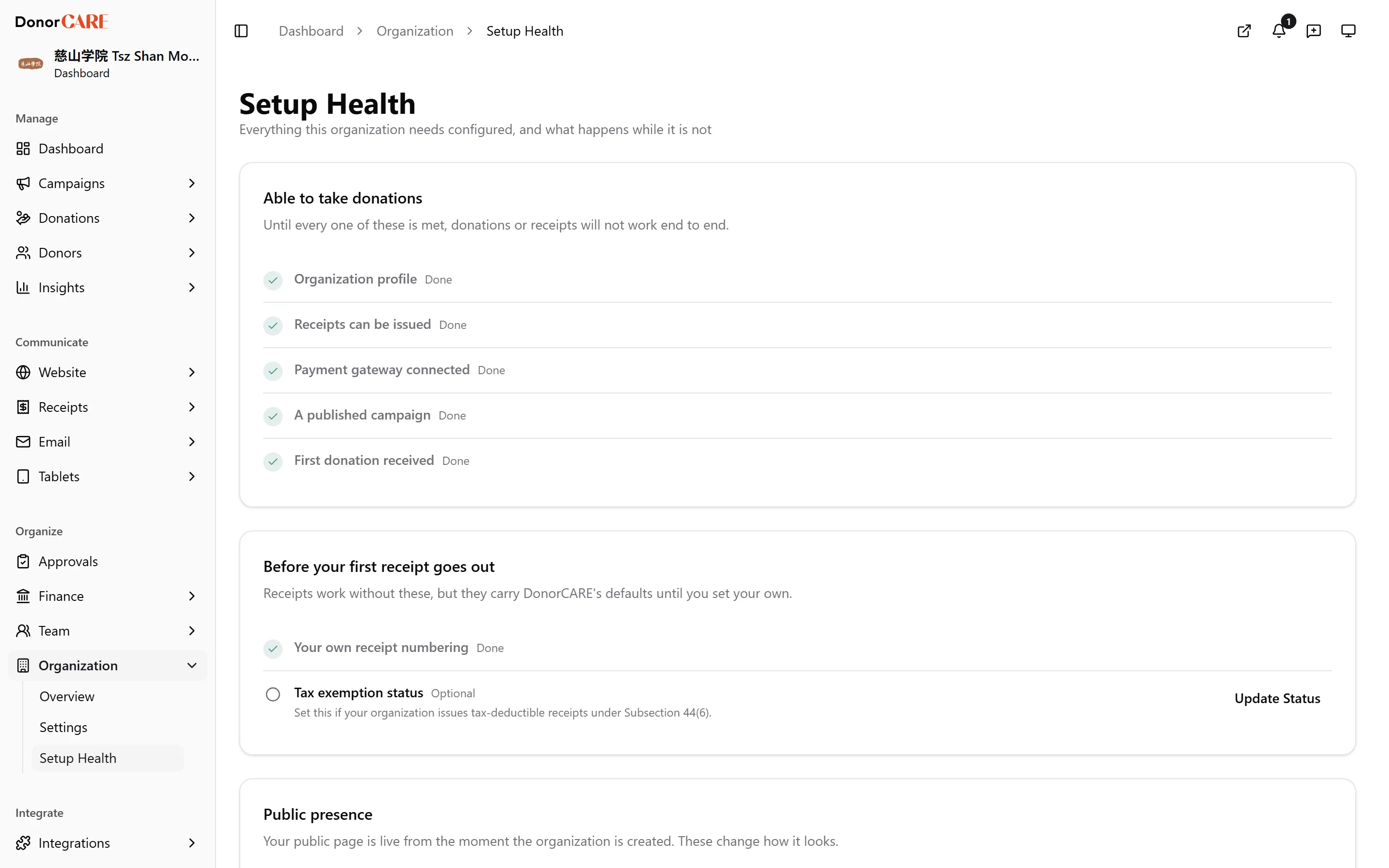
Section titled “Before you start”Sign in and open Organisation → Setup Health. The page splits into two groups: the essentials that block real donations, and health items that never block anything but improve on a default.
-
Complete the organisation profile. Your legal name, registration number and address print on every receipt — until this is filled in, receipts carry blanks where they should carry your details. Completing it unlocks correct receipts.
-
Set up a working receipt template. Without a usable template, a donation can complete without a receipt ever being issued. Completing it unlocks receipt issuance.
-
Connect a payment gateway. Without your own gateway, donations still work, but they’re processed through DonorCARE’s account rather than yours — money isn’t landing where you expect it. Completing it (and switching it on, and setting it as your primary gateway) unlocks campaigns publishing against your own account.
-
Publish a campaign. A draft campaign can’t take donations. Completing it unlocks donations arriving from the public.
-
Take one real donation. This confirms payment and receipt both work end to end — not just that they’re configured. Completing it is your proof the whole chain works, not a configuration step.
-
Set your own receipt prefix. Until you do, receipts go out under the generic
DC-prefix instead of your organisation’s own numbering. Completing it unlocks receipts your donors recognise as yours — see Set your receipt numbering. -
Set your tax exemption status. Only relevant if your organisation issues tax-deductible receipts under Subsection 44(6). Completing it is what a campaign’s tax-deductible opt-in depends on.
-
Add your logo and hero image. Your public page is live from the moment your organisation is created, but shows a placeholder until you add these. Completing it unlocks a public page that looks like yours.
-
Configure your BizCARE API key. Only relevant if you submit e-invoices to LHDN through MyInvois — available on the Enterprise plan. Completing it unlocks e-invoice submission.
If something goes wrong
Section titled “If something goes wrong”| What you see | What it means | What to do |
|---|---|---|
| An item is greyed out with a lock, or marked not applicable | It’s blocked by an earlier unmet item, or isn’t relevant to your plan. | Complete the item Setup Health names as the blocker first, or ignore it if it’s marked not applicable. |
| A gateway shows as saved but the “Able to take donations” item stays unmet | The gateway is switched off, or none is set as primary. | Open the gateway’s settings and confirm it’s enabled and marked primary. |
Related
Section titled “Related”Screenshots use sample data. Every screen on this page is captured against a demo organisation seeded with generated donors, amounts, receipt numbers and campaigns. Any resemblance to a real person or organisation is coincidental.